INSTALLATION GUIDE
E-Power EP96
3-phase Panel Meter · Choose the right CT · Configure correctly · Check before handover
E-Power EP96 device data
OEM base model: ATZ2000
Manufacturer: Hangzhou Antin Power Technology Co., Ltd.
Sold under the E-Power brand as model EP96
HarmonicItem 63
+ Subharmonic
AccuracyClass 0.5S
ProtectionEMC Level 4
Surge4 kV
NetworkRS485
Modbus RTU
38400 bps
Nodes64 Devices
Overload20×
0.5 s
The meter class is not the accuracy of the whole set; the CT/VT, wiring and burden must be considered together.
01
Panel cut-out and mounting
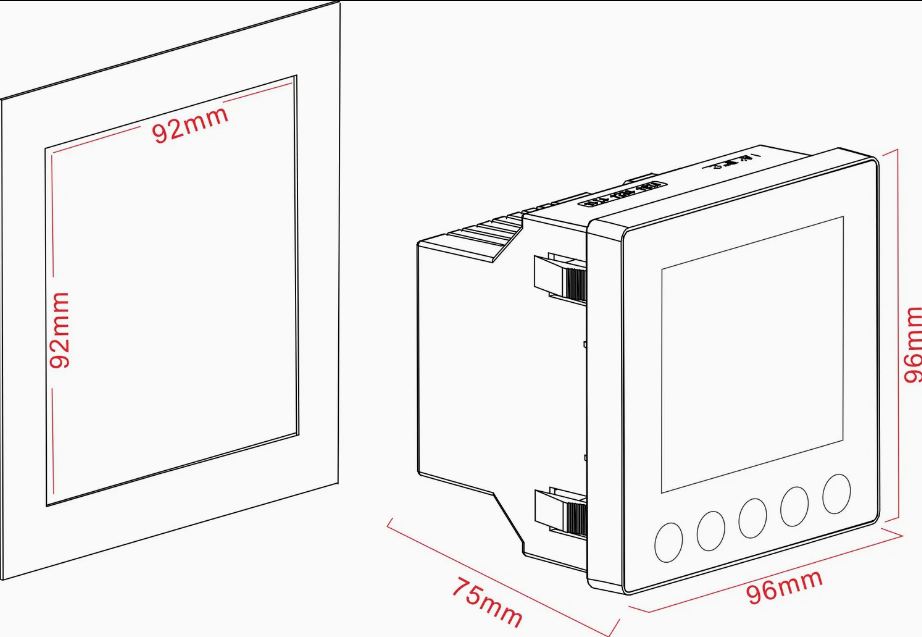
92 × 92 mm
Cut-out size as shown
Meter face 96 × 96 mm · depth 75 mm
Deburr the cut-out, fit the clips firmly, and leave room behind for terminals, cables and maintenance.
Check clearances and panel thickness in the actual model's manual; the picture does not give cut-out tolerances.
02
Get all 3 parts right
1 / Meter
Set 3P3W/3P4W to match the site, and set the CT primary/secondary and VT ratio to the actual equipment.
Select the 1A/5A input to match the CT. Check the input voltage and auxiliary supply before energising.
2 / CT cable
Use copper cable sized and routed to suit the burden. Run S1/S2 as a pair, label each phase and fit suitable lugs.
Count the round-trip length, check the terminals and use a shorting terminal for meter removal.
3 / CT
YHDC SCT024TS
Split core · 100A/5A · Accuracy 1%
Cable window Ø24 mm · reference burden 0.5 VA
Meter setting: CT primary 100 A / secondary 5 A (current ratio 20:1). Check the actual nameplate and VA before use.
Choose a primary current that suits the load, and a secondary 1A/5A, VA and accuracy class that suit the job.
The CT window must fit the actual cable/busbar. Check the insulation rating and the P1 → P2 direction.
On mobile, scroll the picture left–right to see all terminals. Secondary wire colours in the picture only tell the lines apart; they are not the model's colour code.
03
CT cable length and size calculator
Calculated per CT / per phase for a 1A or 5A secondary with two equal copper conductors. The length you enter is the one-way distance from the CT to the meter
E-Power EP96: uses 0.1 VA from the ME96SSRA-MB at 5A for estimation only; this is not a confirmed E-Power EP96 burden spec.
| Reference model | Current input burden | Condition |
|---|---|---|
| Schneider PM2230 / PM2200 | < 0.024 VA | At 6A · 0.024 VA used to estimate the 5A side Not scaled down by I² without confirmed data |
| Mitsubishi ME96SSRA-MB | 0.1 VA per phase | At 5A · the sub-model called ME96mk2 is not yet confirmed |
Only the current-input value is used, never the VA of the voltage or auxiliary circuits. Both reference values limit the choice to a 5A secondary; for 1A, enter the actual model's confirmed data.
The reference CT is 5A only. The 1A option is for calculating other CTs; it does not change the SCT024TS 100A/5A output. At 5A / 2.5 mm² / 20°C the burden-limited maximum length, before adding the meter and terminals, is about 1.43 m.
Rloop = 2 × L × 0.0175 × [1 + 0.00393 × (T − 20)] / S
Cable VA = Isecondary² × Rloop · Total VA = cable VA + meter VA + other VA
Uses the approximate resistivity of copper at 20°C. The result screens the maximum burden only and does not certify the accuracy class: check the manufacturer's rated burden range, the power factor and the actual cable resistance. Not for aluminium cable, shared return conductors or mV/Rogowski CTs.
Reference table: copper cable, 10 m one way, at 20°C
| Cable size | R round trip | Cable burden at 1A | Cable burden at 5A |
|---|
Example 10 m / 2.5 mm²: cable burden about 0.14 VA at 1A or 3.50 VA at 5A For the SCT024TS 100A/5A 1% rated at 0.5 VA, a 10 m / 2.5 mm² cable already exceeds the rating, even before adding the meter and terminals.
The default CT value of 0.5 VA comes from the SCT024TS 100A/5A Accuracy 1% datasheet as a typical value; confirm it against the nameplate/documents of the installed unit. The default meter burden is a reference value: replace it with the value from the ATZ2000 OEM manual by Hangzhou Antin Power Technology Co., Ltd. once confirmed, and make it match the selected secondary current.
05
Always record before handover
Record the CT ratio and VT ratio with evidence of the actual settings in the meter
Site / panel / meter no.: __________________
Date / configured by / checked by: __________________
CT primary / secondary: __________ A / ______ A
VT primary / secondary: __________ V / ______ V
CT model / VA / class / window: __________________
CT cable size / one-way length: ______ mm² / ____ m
Modbus address / baud / parity / stop: __________
Reference load / instrument / before–after: __________
Attach photos of the CT/VT nameplates, the ratio settings screen and the measurement results. If there is no VT, record “Direct input / no VT” with the actual setting.